Sunday, August 13, 2017

Developer’s tools for quick chatbot prototyping: Chatfuel + Gomix + QnAMaker

One day, one of my colleagues asked me a question:
“What tools do you recommend for quickly building a chatbot?”
I knew that she was taking part in a weekly hackathon session with our client where they would quickly brainstorm different ideas, prototype them and make a presentation with a working demo. I also knew that she was a great software developer who could write code on anything from Objective-C to Javascript, but she needed to make the chatbot in a maximum of 1-3 days.
Here is the short version of my answer:
  1. Use Chatfuel for all simple user flows.
  2. Use Chatfuel + Gomix if you need more complex logic, persistency or access to external data.
  3. Use Chatfuel + Gomix + Wit.ai/Api.ai/QnAMaker if you need even more complex interactions with Natural Language Understanding (NLU) and work with a lot of free-form requests from users.
For the purpose of quick chatbot prototyping and even for a first public MVP it’s more than enough technology to build almost everything you need. It’s also not bad for a production release either. Chatfuel is able to serve chatbots with hundreds of thousands of messages per day.
Below is a detailed look at what is available for your disposal at each step.

Ready to build a conversational bot for your business, but confused with the variety of platforms? Let’s talk!

Chatfuel and simple user flows

Almost every chatbot has a tree-like structure, or rather a graph-like structure. It contains edges, vertices, and conditions that direct the user to the correct flow of interactions.
Below is an example of such interactions on My Coffee Shop, a sample bot that I created for the purpose of this article. You can play with this bot in Messenger here and review a backend source code on Gomix.
Simple graph of interactions that you can easily create with Chatfuel
Not all chatbots are equal and some chatbot developers are taking a more serious approach, trying to use generative algorithms, deep RNN with LSTM, memory and attention mechanisms for text comprehension and knowledge management.
Here, however, I’m assuming that these advanced mechanisms are still in the research stage rather than in deployment and the majority of chatbot makers want to test the water in the simplest and fastest way possible. By the way, you still have the option to use almost any complex algorithm and generate your own responses with any Deep Learning algorithm through Chatfuel JSON API.
Chat Bots for Business: The Up-To-Date Guide to Building Chat Bots

It’s like a programming tool for kids, but for building chatbots

Chatfuel is like a graphical programming language with a WYSIWYG-style interface. You create blocks, buttons, quick replies and link it all together.
Here’s how it looks to get a user location, call an external API and get a list of stores in the Chatfuel interface.
Chatfuel Block interface for making graphs of conversations

Default Answer block captures every unprocessed text

Messages that aren’t directly processed by a block (like those waiting for Quick Replies actions or inputs) pass to a Default Answer block handler where you can make whatever NLU analysis that you want in order to handle them. Alternatively, you can just store them for later analysis  in order to refine your questions to better serve users.
Here is a Default Answer block that captures all such requests and sends them to the API endpoint.
Default Answer captures all requests

Store variables and conditions

You can store any user inputs into a variable, or define a block that creates variables based on the position in the graph and use it later for conditions.
Example of using variables `coffee_type` and `milk_type` for JSON Plugin request
Example of using variables coffee_type and milk_type for JSON Plugin request
You can use variables almost anywhere –  as a text output, or as a GET/POST parameter in a JSON Plugin, etc.

“Go To block” feature

It’s a blessing and a curse thing that gives you immense power but can be tricky to debug later if you overuse it.
Ask about milk type only for `Cappuccino` and `Flat White` coffees
Ask about milk type only for Cappuccino and Flat White coffees
But there are a lot of out-of-the-box integrations in Chatfuel that work without any assistance.

Chatfuel AI and Stochastic Responses

Built-in AI can handle various free-form pattern matching so you can catch the phrases and provide the user with the most relevant responses. There’s also a random mechanism in AI that makes it less deterministic and introduces some intrigue into a conversation.
Stochastic AI behaviour
The same random feature is available in Go To blocks as well, so if there are matched criteria you can provide a couple of possible outcomes that will be selected randomly.

Some plugins are like huge modules in your program

There are a lot of other plugins, each designed to suit a specific case that you can explore in your own time. They can be seen as a subprogram or as modules in your program. For example Live Chat or Chat Room plugins give you the complete flow of user interactions that you can’t fine tune for small details, but they work well as they are.
List of Chatfuel Plugins
Or to give another example, Subscriber, Subscriptions List, Google site search, Bing search and RSS Import give you the whole complex web of interactions that enables managing subscriptions and automatic push notifications about new content in your bot without any line of code.

Using JSON API Plugin for complex user flows

This is a window to the outside world where you can send and receive data in your graph flow. It’s the essential link to any external API that you want to connect to. It’s a barebones, powerful plugin and I’m glad the developers didn’t restrict it and are continuing to extend its functionality.
JSON API can return text messages, image/audio/video messages, templates with buttons, templates with quick replies, templates with a gallery and the whole set of airline templates. With its help you can also receive postbacks when the user clicks on return buttons and continue interactions between the user and a backend.
Here’s how I return stores by location zip (though I’m not making a real search here, it’s a demo app so that I can model the process :)
Gomix endpoint returns a gallery of nearby places
Search results in a bot:
A gallery of nearby places
Another useful feature is the ability to set up variables from JSON API to the Chatfuel graph, which is very helpful in controlling complex logic flows.

JSON API Plugin + Gomix

Gomix is a Node.js environment hosted in a cloud where you can edit each file online right in the browser in collaboration with others. So it’s an ideal candidate for quick chatbot prototyping and you can use it as a connection between Chatfuel JSON API Plugin and any other external API.
Yes, it’s easier than Digital Ocean Node.js server or Amazon’s Lambda function; just try it on the backend of my sample My Coffee Shop bot.
Here’s how I serve coffee for My Coffee Shop customers through the Giphy API on Gomix.
Order Coffee endpoint returns Giphy image by ‘coffee_type’ and ‘milk_type’
And from the user’s point of view.
Order coffee user flow

Add even more power with Wit.ai/Api.ai/QnAMaker integrations for Natural Language Understanding (NLU)

Not everything is so simple in chatbot text interactions and sometimes you need a better understanding of the input text. The beauty of Gomix is that it’s an unrestricted Node.js environment and you can use it to call any third party API and have the power of Javascript to process responses.
Here’s an example using Microsoft’s QnAMaker.ai for processing user inputs that were not captured by a Chatfuel flow.
QnAMaker.ai integration with Chatfuel
From the user’s perspective.
FAQ user flow inside the bot
So I think you’ve got the idea, it’s just API calls with some processing.

Chatbot Analytics

Whatever chatbot prototype you are building you need to measure all the important metrics, such as popular user utterances, popular blocks, user retention, etc. Such high level metrics are all available in Chatfuel Analytics.
Analytics Activity for a Bot
However, if you connect a Yandex.Metric account to a Chatfuel Analytics page you will have access to all events in .csv or .json format through the Yandex Logs API.
Ready to build a conversational bot for your business, but confused with the variety of platforms? Let’s talk!

Summary

Chatbots constitute a new paradigm shift in technology, allowing us to build apps right inside messenger platforms so the user doesn’t need to download and install them separately.
As Benedict Evans pointed out, we are on the edge of Mobile 2.0 transformations and we are going to keep building on top of other apps (What’s App micro apps, Messenger bots, Skype bots, Google Maps integration, Amazon Alexa Voice skills, etc.) rather than for just mobile.
In today’s rapidly changing technological landscape, time to market matters more than sophistication and cost of development matters more than having a state-of-the-art conversational algorithm.
As a chatbot service provider we understand the need to use existing technology and move really quickly in order to deliver meaningful value for our customers. Later on when you have validated your idea and see that people love your chatbot you can build it on top of the best AI algorithms and make your own Facebook API integration, but before this happens I think it makes a lot of sense to use existing solutions for experiments and first trials.
Unless, of course, you want to push an AI research community forwards, but this is a completely different story and a topic for the next article.
Happy chatbot building!

#3 Machine learning, neural networks and algorithms

This article is part of a series about Chatbots and Machine Learning. Previous articles that were published in this series can be found here:
#1: Chatbots: A bright future in IoT?
#2: Natural Language Processing and Machine Learning: the core of the modern smart chatbot
Following the previous article about ‘The Core of the modern chatbot’, this article will give a deeper understanding about the technologies needed for chatbots.

Machine learning

NLP (Natural language processing) and Machine Learning are both fields in computer science related to AI (Artificial Intelligence). Machine learning can be applied in many different fields. NLP takes care of “understanding” the natural language of the human that the program (i.e. chatbot) is trying to communicate with. This understanding enables the program (i.e. chatbot) to both interpret input and producing output in the form of human language.
The machine “learns” and uses its algorithms through supervised and unsupervised learning. Supervised learning means to train the machine to translate the input data into a desired output value. In other words, it assigns an inferred function to the data so that newer examples of data will give the same output for that “learned” interpretation. Unsupervised learning means discovering new patterns in the data without any prior information and training. The machine itself assigns an inferred function to the data through careful analysis and extrapolation of patterns from raw data. The layers are for analyzing the data in an hierarchical way. This is to extract, with hidden layers, the feature through supervised or unsupervised learning. Hidden layers are part of the data processing layers in a neural network.

Neural Networks

Neural networks are one of the learning algorithms used within machine learning. They consist of different layers for analyzing and learning data.
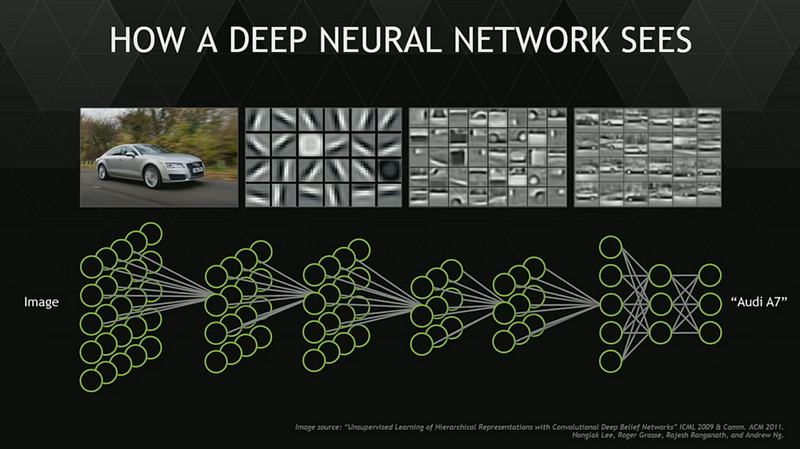
Hidden learning layers and neurons by Nvidia
Every hidden layer tries to detect patterns on the picture. When a pattern is detected the next hidden layer is activated and so on. The picture of the Audi A7 above illustrates this perfectly. The first layer detects edges. Then the following layers combine other edges found in the data, ultimately a specified layer attempts to detect a wheel pattern or a window pattern. Depending on the amount of layers, it will be or not be able to define what is on the picture, in this case a car.The more layers in a neural network, the more is learned and the more accurate the pattern detection is. Neural Networks learn and attribute weights to the connections between the different neurons each time the network processes data. This means the next time it comes across such a picture, it will have learned that this particular section of the picture is probably associated with for example a tire or a door.

Machine learning algorithms

This chapter shows some of the most important machine learning algorithms, more information about algorithms can be found via the following links. [1][2][3]
Decision Tree Algorithms
In this algorithm a decision tree is used to map decisions and their possible consequences, including chances, costs and utilities. This method allows the problem to be approached logically and stepwise to get to the right conclusion. An important algorithm that evolved from this algorithm is the Random Tree algorithm. This algorithm uses multiple trees to avoid overfitting that often occurs with using decision trees.
Bayesian Algorithms
Applies Bayesian theorem for regression and classification problems involved with probability. It attempts to show the probabilistic relationship between different variables and determine, given the variables, which category it more likely belongs to.
Regression Algorithms
Well suited to statistical machine learning, regressions seek to model the relationship between variables. By observing these relationships you aim to establish a function that more or less mimics this relationship. This mean that when you observe more variables you can say with some confidence and with a margin of error, where they may lay along the function.
Support vector:
The support vector algorithm is used in the grouping of points on a dimensional plane. The grouping is done by creating a hyperplane that separates the groups with a margin that is as wide as possible. This helps with the classification and is used for example in advertising or human RNA splicing.
Ensemble methods:
Ensemble methods combine various weaker supervised learning algorithms. A combination of very different models will usually produce better results. By combining the various methods you can handle bias with certain models, reduce the variance and reduce overfitting by averaging it out more.
Clustering Algorithms
The main purpose of this algorithm is to cluster the available data into groups, where the data points in such a group are more similar to each other than those in other groups. The more important clustering methods are hierarchical, centroid, distribution and density.
Association Rule Learning Algorithms
This is about the rules that can be established between the itemsets and the transactions for these items and item sets. The relation between X and Y, thus the probability of when you obtain X you also obtain Y. This rule is found in the database by observing the itemsets and the items therein.
Artificial Neural Network Algorithms
Artificial Neural Network algorithms are inspired by the human brain. The artificial neurons are interconnected and communicate with each other. Each connection is weighted by previous learning events and with each new input of data more learning takes place. A lot of different algorithms are associated with Artificial Neural Networks and one of the most important is Deep learning. An example of Deep Learning can be seen in the picture above. It is especially concerned with building much larger complex neural networks.
Dimensionality Analysis Algorithms
Dimensionality is about the amount of variables in the data and the dimensions they belong to. This type of analysis is aimed at reducing the amount of dimensions with the associated variables while at the same time retaining the same information. In other words it seeks to remove the less meaningful data while at the same time ensuring the same end result.

#2 Natural Language Processing and Machine Learning: The core of the modern, smart chatbot

This article is the second part in a series about Chatbots and Machine Learning. Other articles that were published in this series can be found here:
#1: Chatbots: A bright future in IoT?
#3: Machine learning, neural networks and algorithms
In the previous article about chatbots we discussed how chatbots are able to translate and interpret human natural language input. This is done through a combination of NLP (Natural Language Processing) and Machine Learning. The dialog system shortly explained in a previous article, illustrates the different steps it takes to process input data into meaningful information. The same system then gives feedback based on the interpretation, which relies on the ability of the NLP components to interpret the input. Today we will talk about NLP components and what they are able to do.

NLP, the dialog system and the most common tasks

A lot of companies are trying to develop the ideal chatbot, that can have a conversation that is as natural as possible and that it is indistinguishable from a normal one between humans.
The simpler older chatbots, are the chatbots that employ heuristics with pattern recognition, rule based expression matching or very simple machine learning. The important aspect is that these systems are good at comparing a fixed set of rules.
The newer smarter chatbots employ deep learning to not only analyze human input but also generate a response. The response analysis and generation is learned through the deep learning algorithm that is employed in decoding input and generating a response. NLP then also translates the input and output into a textual format that is both understood by the machine and the human.
If you look at the simpler chatbots, any response (provided it was correct grammar beforehand) is void of any grammatical error. This is of course due to the pre-written sentences in the repository. It might however be unable to handle any input it does not recognize because of human grammatical errors or not matching sentences. The newer smarter chatbots are the exact opposite, if they are well “trained” they can recognize the human natural language and can react accordingly to any situation. However, the big disadvantages is that these natural responses require a great amount of learning time and data to be able to learn the vast amount of possible inputs. The training will prove if the bots are able to handle the more challenging issues that are normally obstacles for simpler chatbots.
Depending on the question, these can be long or short conversations. Longer conversations tend to have deeper meanings and multiple questions that the chatbot would have to consider in its extrapolation of the total picture.
Ultimately the tasks that NLP should be able to handle are in the following summary. The following task can be text, speech and even image related:
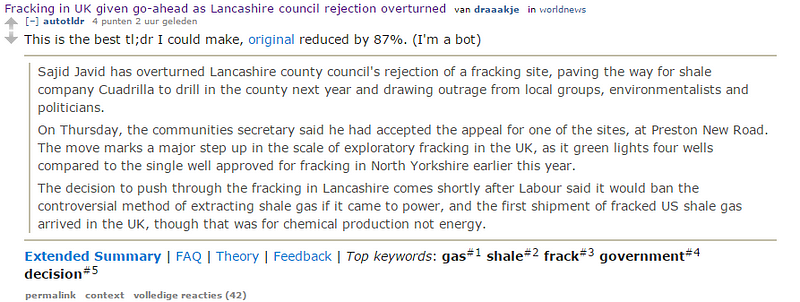
  • SummarizationSummarization deals with summarizing large amount of text in a short but precise explanation. A great example of this is the summary or tl;dr bot from reddit.
  • Example of summary bot from Reddit, original source is here.
  • Open and Closed QuestionsModern chatbots should be able to answer any question whether it is open or closed. There is for example a huge difference between, “Is London the capital of the UK ?” instead of “Why is London the capital of the UK?”
  • ConferenceThis section has to do with relating objects with words. For example “The office is situated in Rotterdam.” the bot has then to be able to confer from other sentences which office is meant. It should be able to connect the previously mentioned office owner to this particular sentence.
  • AmbiguityAmbiguity is related to the context and meaning of the sentence. Not only is the bot responsible for correctly associated the meaning with the word, but also some languages are more ambiguous than others. This is especially true when analyzing human speech.
  • MorphologyEach language has a different morphology, the chatbot has to able to separate words into individual morphemes.
  • SemanticsSemantics is the meaning of sentences or words in the associated human natural language. This section particularly deals with natural language understanding and natural language generation. The ability for the chatbot to translate any human natural language, whether its for creating a response or analyzing questions.
  • Text structureRelated to the structure of texts, punctuation and use of spaces. This greatly differs between languages.
  • SentimentThe chatbot should be able to detect the emotional polarity of the subject the human is talking about. It should be able to tell from the way the text or speech pattern is presented whether the human is angry, sad or happy.
Today we have discussed older chatbots, smart chatbots and various elements of NLP. In this series, the previous article was about the use of chatbots in various situation, the current article is about NLP and the future article will be about machine and deep learning. Another future item will include programming languages for developing a chatbot.

#1: Chatbots: A bright future in IoT?

This article is the first part in a series about Chatbots and Machine Learning. Other articles that were published in this series can be found here:
#2: Natural Language Processing and Machine Learning: the core of the modern smart chatbot
#3: Machine learning, neural networks and algorithms
By 2020, it’s estimated that around 20 billion ‘connected things’ can be found in an IoT environment. It will be a challenging task to build interfaces that can handle the huge amount of things and data that come with this development. In this article, I will elaborate on the possible role of chatbots within this environment.

What exactly is a chatbot?

There are already well known examples of AI and chatbots, for example Cleverbot, Cortana or Tay. Tay, Microsoft’s first public experiment with a Twitter bot, was so successful that it started mimicking its followers. However, after 16 hours of being “alive” Microsoft had to pull Tay’s plug because it had turned into a feminist bashing racist xenophobe. Even though it was considered a failure, it showed how much the technology around smart chatbots had evolved. Tay could give coherent and meaningful answers to questions and even join a whole conversation.
Chatbots use a dialog system to have a conversation with a human. There are a few steps a chatbot goes through to process human information:
The first step is converting human input into an understandable context for the chatbot. This is done through input recognizers and decoders, which can analyze speech, text and even gestures. The next step is applying Natural Language Processing to analyze the plain text and search for semantics. All the while the input is managed and processed by a dialog manager to ensure a correct flow of information from and to the participant.
The dialog manager also makes sure that questions or issues are assigned to the right task manager and solved. After the tasks are solved the output manager translates the solution into “human like output”. This is done through a natural language generator to mimic human speech. The output rendered will then regulate how the output is communicated, e.g. through audio, voice and in a visual format as well.
Depending on the status of advancement of the natural language processing and its engines for processing the information, the chatbot is thus able to mimic human language and interpret and communicate efficiently. So how can the chatbot be helpful to an IoT environment ?

An interface for an IoT environment?

In an IoT environment, chatbots can function as an interface to make sense of all the data and also make it more accessible.
Facebook Messenger’s chatbot SDK provides companies a platform where they can integrate their own service within the accessibility of the Messenger app. Below, I use the examples of Uber and a shoe retailer to illustrate how the messenger can be used:
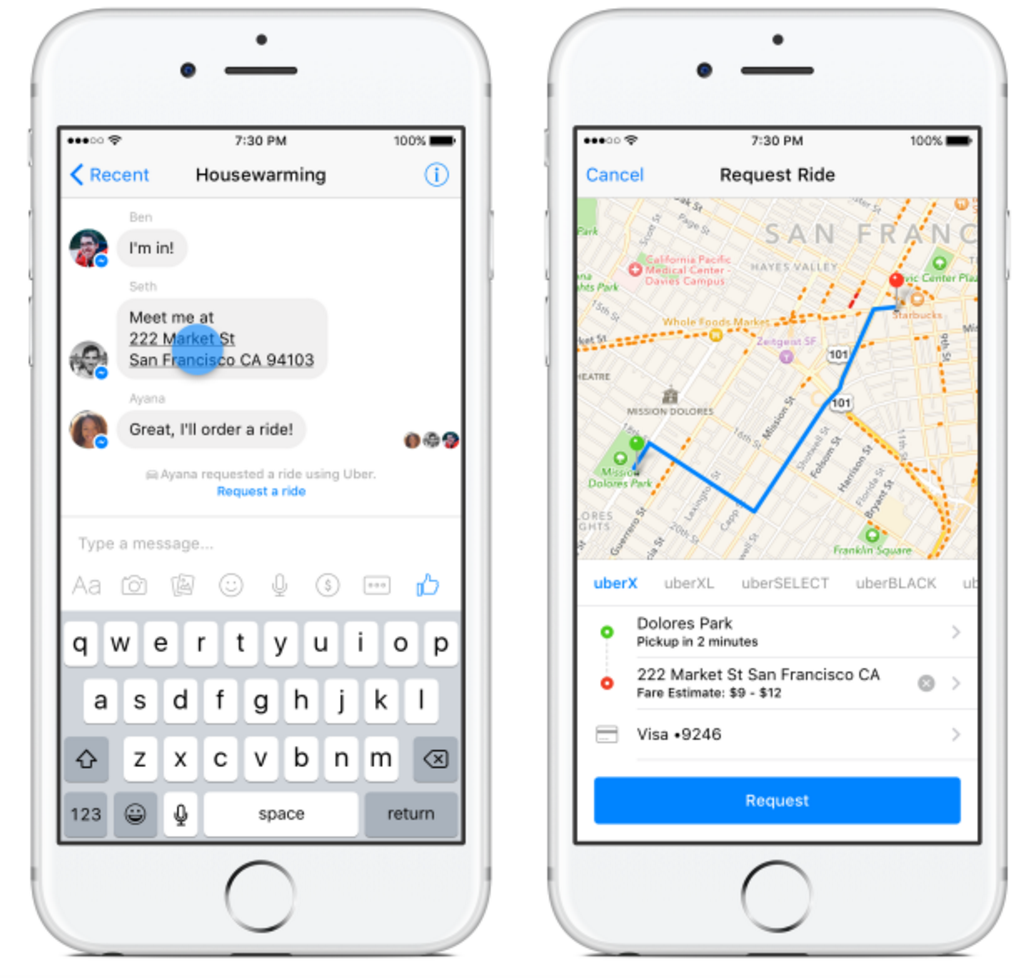
Combining Facebook Messenger and Uber to order a taxi more easily by Facebook.
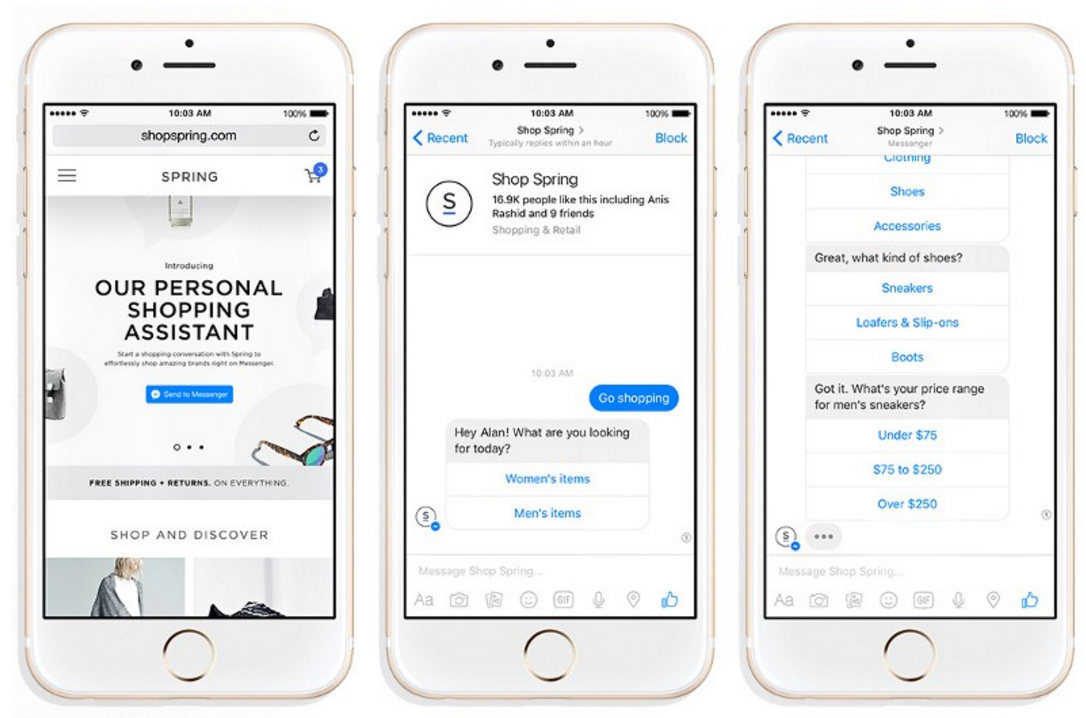
An address within a conversation is recognized by Messenger and will be automatically highlighted. With the example of Uber, users are able to get a ride to the specific address within minutes when they click on an address. The show retailer on the other hand, is a great example for illustrating how the chatbot technology can be used when connecting it with an e-commerce solution. Users can initiate a conversation with their chatbot, which will then determine through questioning which kind of shoes they would like.
Combining Spring shoe shopping with Facebook messenger by Facebook
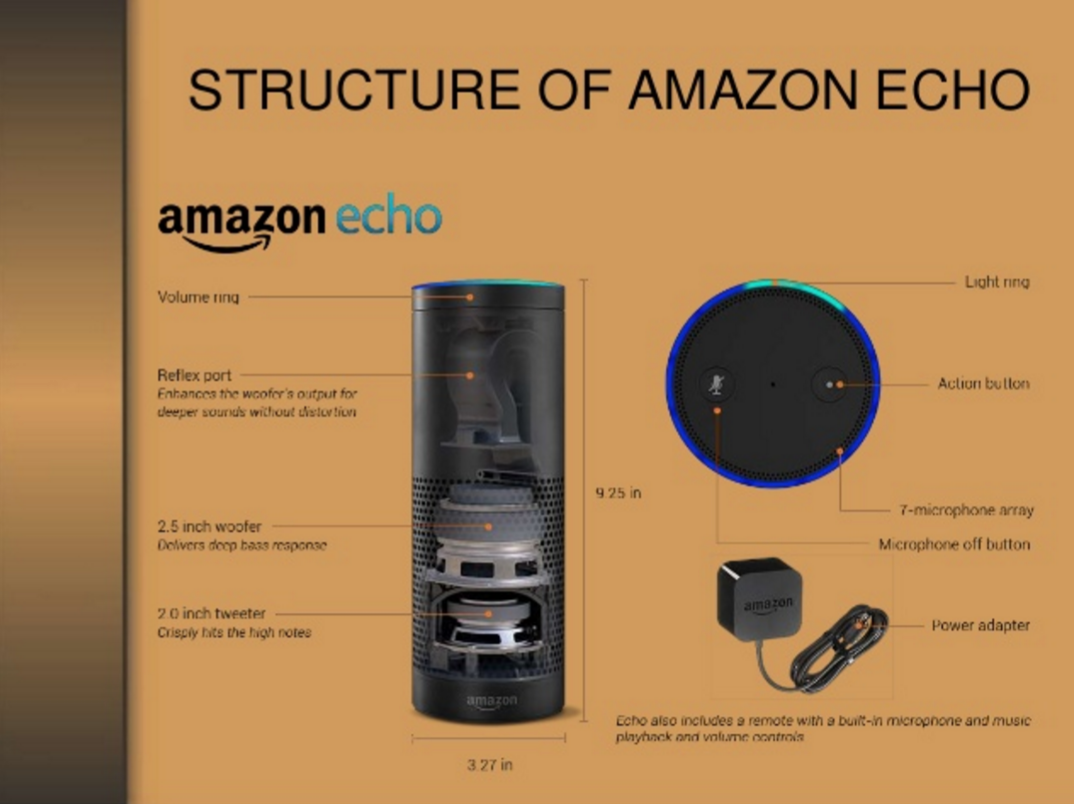
Another interesting example is Amazon Echo is an example of integrating speech in your chatbot experience, it will allow you to order anything from the Amazon webshop. A new report, states that Amazon has sold near 3 million Amazon Echo smart speakers which supports the belief that chatbots are the future of IoT and retail, and it will be interesting to see what else retailers come up with in the coming years.
Amazon Echo by Harshit Shah

Where can I create a Chatbot for free online?


There are several solid options, but they depend on how much technical skill and work you are ready to put in.
If you are a developer looking for something to make your life easier:
  • Wit AI – a great tool for NLP and creating decision-based conversations and flows. Really easy to get started with. Mostly used for Messenger bots as it was acquired by Facebook.
  • Botkit – a great set of open-source tools for devs looking to build bots.
  • IBM’s Watson – very powerful, but comes with a steep learning curve.
  • API AI – haven’t tried this yet, but I do like the docs and examples on their site.
If you do not have any programming skills and are looking to develop something without coding:
  • Chatfuel – very powerful and easy to use. It’s a YCombinator company so I have high hopes for them!
  • MotionAI – also really good bot builder. They have a bot marketplace where you can buy and sell complete bots and conversation modules.
  • Octane AI – haven’t tried this yet, they are still in early beta. However, it seems really promising and you can request an invite.
And finally, Gupshup fits into both categories as they have several products – an IDE for developers and a flow-builder for non-developers.
If you are looking for general tips on how to design, build, market, and profit from bots, I suggest you follow Chatbot Magazine. I also do a bit of blogging on the topic, specifically on how to build bots with empathy.

How can I build an intelligent chat bot?


Here is a Look at the 2 NLP vs Machine Learning:
  1. NLP/NLU: Natural Language Processing (NLP) and Natural Language Understanding (NLU) attempt to solve the problem by parsing language into entities, intents and a few other categories. Different NLP platforms may have different names however the essence is moreso the same.
    1. Here are categories:
      1. Agents correspond to applications. Once you train and test an agent, you can integrate it with your app or device.
      2. Entities: represent concepts that are often specific to a domain as a way of mapping natural language phrases to canonical phrases that capture their meaning.
      3. Intents represent a mapping between what a user says and what action should be taken by your software.
      4. Actions correspond to the steps your application will take when specific intents are triggered by user inputs. An action may have parameters for specifying detailed information about it.
      5. Contexts are strings that represent the current context of the user expression. This is useful for differentiating phrases which might be vague and have different meaning depending on what was spoken previously.
    2. Here are a few NLP Platforms:
      1. API: Conversational UX Platform for Bots, Apps, Devices, Services,
      2. WIT: Wit - landing ,
      3. LUIS: Language Understanding Intelligent Service (beta)
  2. Machine Learning: The ‘other’ option is to build your own NLP/NLU by using Machine Learning. One of the first things to consider will be the type of model you want to build.
  • Do you prefer Retrieval Based Model or a Generative Model?
RETRIEVAL-BASED VS. GENERATIVE MODELS
Retrieval-based models (easier) use a repository of predefined responses and some kind of heuristic to pick an appropriate response based on the input and context. The heuristic could be as simple as a rule-based expression match, or as complex as an ensemble of Machine Learning classifiers. These systems don’t generate any new text, they just pick a response from a fixed set.
Generative models (harder) don’t rely on pre-defined responses. They generate new responses from scratch. Generative models are typically based on Machine Translation techniques, but instead of translating from one language to another, we “translate” from an input to an output (response).
Open Domain: I can ask a question about any topic… and expect a relevant response. (Harder) Think of a long conversation around refinancing my mortgage where I could ask anything.
Closed Domain: You can ask a limited set of questions on specific topics. (Easier). What is the Weather in Miami?
You will also have to consider things like: Context, Personality, Evaluation Models, etc…
Here is a NLP & Machine Learning Tutorial with Code & Github: Ultimate Guide to Leveraging NLP & Machine Learning for your Chatbot
You can also check out Bot Tools, Templates & Workshops: Chatbot Tools
You can learn more at Chatbots Life & Follow me on Twitter

Launching Built-in NLP for Messenger and Sunsetting Bot Engine (beta)

 27 Jul 2017  entities, news
We have a few updates to share with you today - most exciting is the launch of Built-in NLP for Messenger, launching with Messenger Platform 2.1 just released today.
By testing and learning from our Bot Engine beta, we determined that it made the most sense to refocus on pure NLP to make it accurate, reliable and scalable for everybody. As a result, we’re sunsetting Bot Engine and will deprecate the Stories UI for new apps starting today. We will also stop serving requests to the associated /converse endpoint on February 1, 2018.
Built-in NLP
Over the past year, we have received a lot of questions and feedback on how to integrate Wit.ai NLP into bots for Messenger. Currently, if you are leveraging an NLP API, it is an additional layer that adds both latency and complexity. We believe almost every bot should use NLP in some way to create delightful experiences. Today, we are excited to make this easier by integrating Wit directly into the Send/Receive Messenger API.
When Built-in NLP is enabled, it automatically detects meaning and information in the text of messages that a user sends, before it gets passed to the bot. This first version can detect the following entities: hello, bye, thanks, date & time, location, amount of money, phone number, email and a URL. This is the first step in bringing NLP capabilities to all developers. Learn more.
Sunsetting Bot Engine
Most of you may know that we created Bot Engine at the beginning of 2016 to help developers build text-based conversational bots. At that time, NLP was still new to many, the bot ecosystem was small and developers did not have the tools we have today (e.g. Chatfuel, Botpress, etc.).
Bot Engine was designed for complex text-only transactions because messaging platforms did not have GUI (Graphical User Interface, like webviews) elements then. The idea was to replace forms with conversations. However for many use cases, a dialog does not provide the pleasant user experience you get with a GUI (constant visual feedback, ability to modify previous choices, etc.).
That’s why in the last year, the ecosystem has shifted towards a mix of NLP and GUI elements to produce a user experience on par with native and web apps. For instance, Messenger has introduced quick replies, menus and even web view. As a result, Bot Engine and its emphasis on text-only bots has become somewhat obsolete.
Upon reviewing the top apps using Stories, we’ve mainly seen apps using 1-turn stories. These FAQ-like apps can easily be achieved with our NLP endpoint (/message) because it’s about understanding the question and then mapping the user intent to an answer that can be stored outside of Wit. Example here. These apps don’t need the power and complexity of Stories (having to do 4 calls on average to /converse to get to an answer as opposed to 1 single call for /message). The recommended migration is to use /message and code on your side to manage the conversation and link to the answers that would be stored in your database.
The numbers talk for themselves. Since the launch of Bot Engine in 2016, we have seen our community grow from 20,000 to more than 100k developers. Most of them build bots for Messenger, Slack, Telegram, and other platforms and use our NLP API (/message). Currently, more than 90% of the Wit API calls are coming from our NLP API.
This is why we are deprecating Bot Engine and the Stories UI today, and will stop serving requests to the associated /converse endpoint on February 1st 2018 to give developers enough time to migrate affected apps. Please check our GitHub tutorial for more details.
We want to make NLP work really well, at scale. This lets developers focus on building the best possible user experience, be it conversational, or hybrid NLP/GUI. This is why we have scaled our /message endpoint to make it easy to programmatically interact with Wit.
Moving forward, we are working on:
  • improving the quality of our NLP by leveraging cutting-edge algorithms developed at Facebook
  • making it easy to share, reuse, and collaborate on entities from the community
  • helping other platforms leverage our NLP API behind the scenes
As always, feel free to reach out if you have any questions, comments, or suggestions.
Team Wit